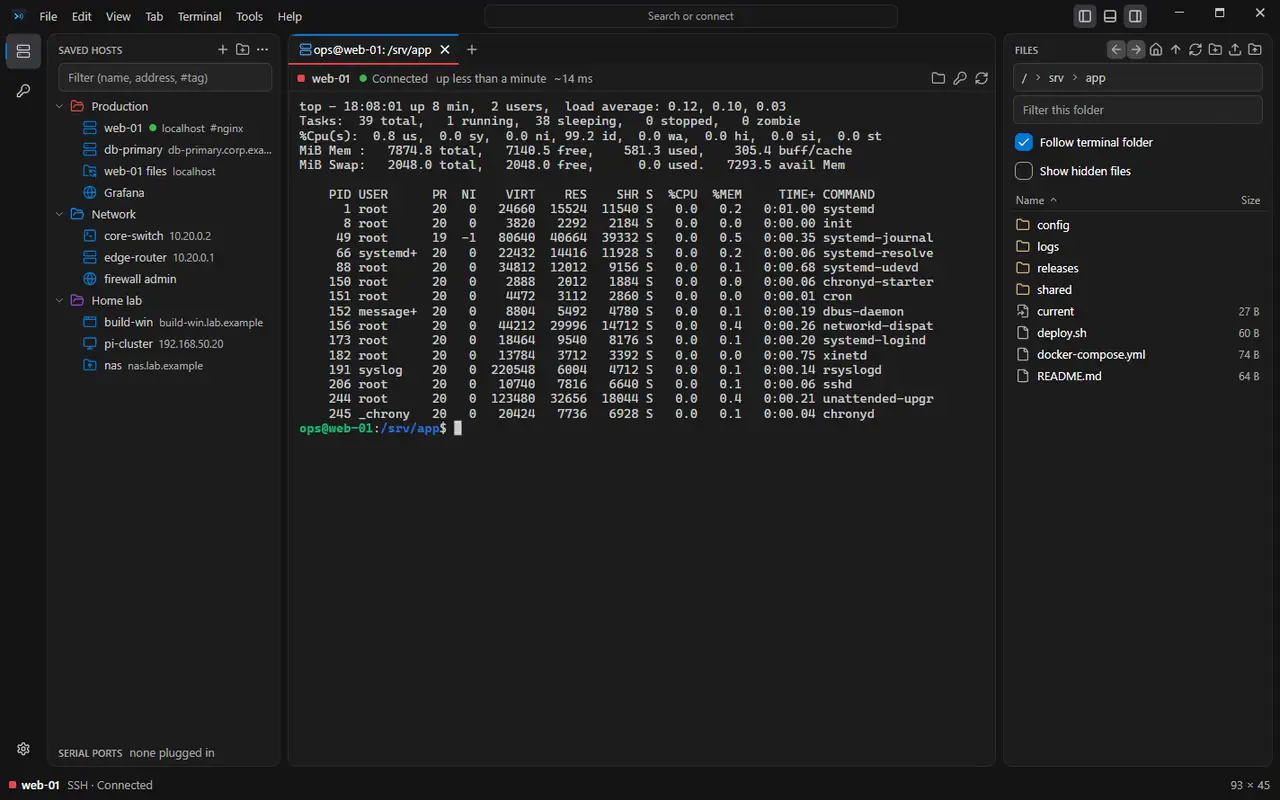
Your servers, switches and desktops, in one window.
SSH, SFTP, RDP, VNC, Telnet, FTP, serial consoles and device web pages, in tabs you can split and dock. Type user@host to connect, or pick from folders that hand their user, key and jump host down.
Free for personal use, every feature included. Testers get the first builds.

One app instead of six
Every kind of connection is saved in the same tree, opens in the same tabs and goes through the same jump hosts. The box at the top takes an address and works out the rest.
| Kind | For | Open with |
|---|---|---|
| SSH | Terminals with keys, agents, chained jump hosts, port forwards and X11. | user@host |
| SFTP | A file browser beside the terminal, or in a tab of its own. | sftp://host |
| RDP | Windows desktops, through an RD Gateway if needed, each in its own process. | saved host, .rdp |
| VNC | Linux and macOS desktops, with encrypted sign-in. | saved host |
| Telnet | Switch and router consoles, with Break and the other special keys. | telnet://10.0.0.2 |
| FTP | FTPS by default, certificates pinned, in the same file browser as SFTP. | ftps://nas |
| Serial | USB console cables, remembered by device, with baud detection. | COM3 |
| Web | A device's admin page in a tab, through an SSH host when it's only reachable there. | https://10.0.0.1 |
A tour of the app
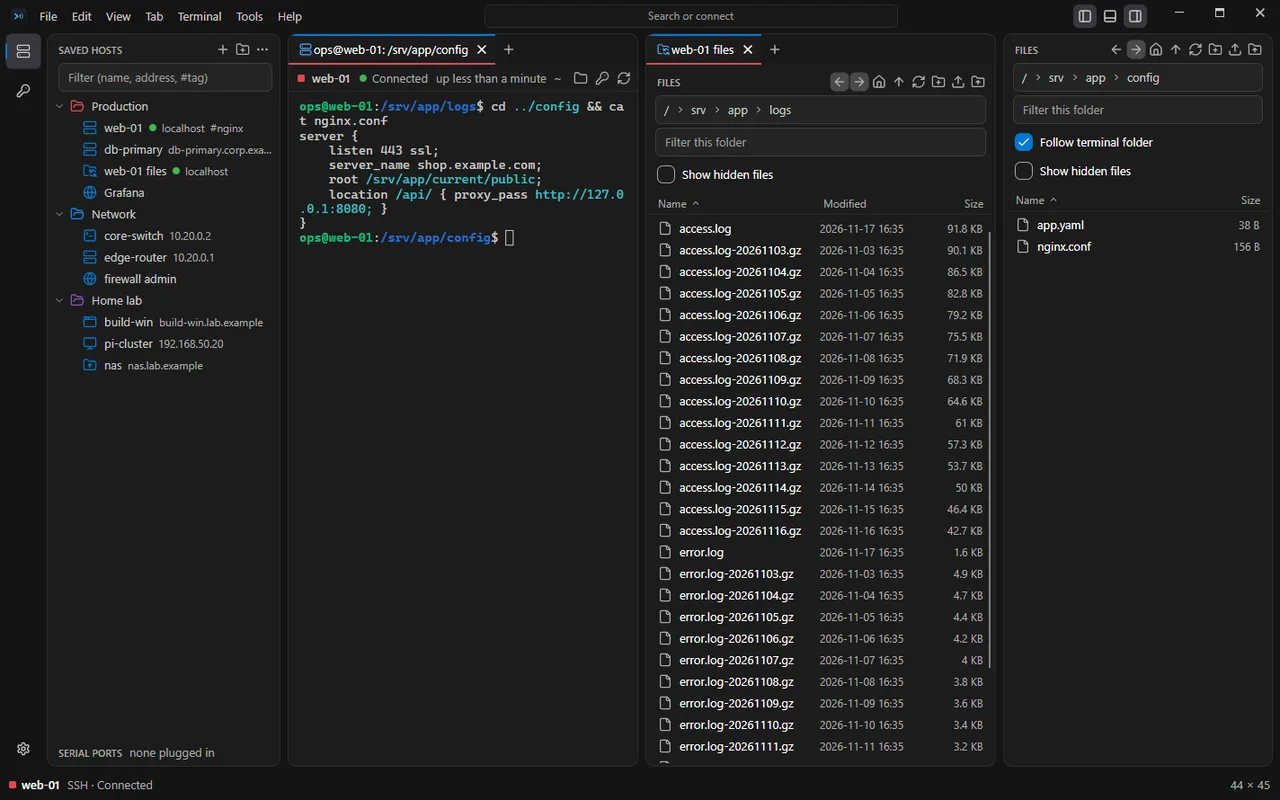
terminal + files
The files follow your cd
Every SSH tab has a Files panel that moves with the shell. Open a config, save it, and it goes back the safe way: a temporary file first, then swapped in.
- Drag files in from Explorer
- Edit remote files in place
- Downloads marked as from the internet

keyboard
Split it, then never reach for the mouse
Ctrl+Shift+P lists every command, Ctrl+Shift+O finds a host or a tab. Split tabs side by side and move between them with Shift+Alt and the arrows.
- Any shortcut can be changed, or given to a saved host
- Keys can be left to tmux and vim
- Float a tab in its own window
sftp + ftp
File servers you browse like Explorer
SFTP and FTP servers open in a tab of their own: sort, filter, rename, and move whole folders up and down, with a transfer queue that asks before it overwrites.
- FTPS by default, certificates pinned
- Through a jump host, like a terminal
- A tab, or a panel beside the shell

saved hosts
One dialog for every kind of connection
Switch the protocol and the name, color and tags stay. Folders pass their user, port, credential and jump host down, so a hundred servers take minutes to set up.
- Imports from PuTTY, MobaXterm, SecureCRT, mRemoteNG, RDCMan
- .rdp files and OpenSSH config too
- Tags and colors on hosts and tabs

and more
The rest of what you'd reach for
Jump hosts and tunnels
Chained jump hosts, each key checked; local, remote and SOCKS forwards, and tunnels without a terminal.
Broadcast typing
Type into a group of tabs at once. Each one signs in on its own first.
Workspaces
Save a set of tabs and how they are split, and open it again later.
Snippets and macros
Saved commands a key away, and macros that wait for a prompt, then type.
Highlighting and logs
Keywords colored in every terminal, session logs to files, and find in all terminals.
Network tools
Ping, traceroute, port and network scans, a subnet calculator and a TFTP server.
Local shells
PowerShell, Command Prompt, each WSL distro and Git Bash; your own shells on Linux.
Password managers
Passwords from Bitwarden, 1Password or Azure Key Vault, used by reference.
Backups
Hosts, credentials and settings in one file, locked with a password, a YubiKey, or both.
How it treats access
- Host keys are checked, every time
- A key or certificate that changed stops the connection and says so. Nothing is accepted quietly.
- Passwords stay in the keychain
- The Windows Credential Manager or the Linux keyring, behind a master password or Windows Hello if you want one, or in your password manager. Never in Relaix's own files.
- No telemetry in the app
- No account and no usage data. It checks for updates, and you can turn that off.
- Ready for IT
- Group Policy and Intune settings, an audit trail, and imports from PuTTY, MobaXterm, SecureCRT, mRemoteNG and RDCMan.
Lately
0.1.0 preview 6 · 17 November 2026
- Back up everything into one file: credentials, hosts, settings, shortcuts. Lock it with a password, a YubiKey, or both.
- Linux: passwords in the desktop keyring, locking with the screen, SSH agents through SSH_AUTH_SOCK.
- Import finds PuTTY, MobaXterm, SecureCRT, mRemoteNG and OpenSSH sessions on this computer, one click each.
- A new name and icon. The app was called Conduit while it was being built.
Free at home. A license at work.
Every feature is in the free edition. Using it for work? A per-user license covers it.